ShopDreamUp AI ArtDreamUp
Deviation Actions






Badge Awards
Description
************************************************
WARNING: For the time being, I am sad to say that the project is discontinued. The iconset still works perfectly, but unfortunately I do not have enough time and work-life balance to focus on it any more. With enough third-party support, I can think of revitalizing it back, but for now I am not actively developing it any more. Feel free to drop me an email if you are interested in continuing its development!
I will also probably add the icons to GitHub, in order to align better with my workflow that mainly uses github. My other iconset, i.e. the phantasmagorically awesome FlatWoken icon theme, is already there. Download it here -> github.com/alecive/FlatWoken
Also, I am not very active on deviantart any more. I will keep the account open for legacy purposes, but I have moved on with my life and I cannot juggle with icon design any more.
************************************************
Please consider a small donation (1$ goes a long way) via PayPal to "alecive87@gmail.com"
************************************************
Before asking, if you have any problem, run at least once the customization script, and TAKE A LOOK AT THE README FILE!!!
************************************************
This iconset is only for GNOME/XFCE/LXDE. The kde version is available here -> alecive.deviantart.com/art/kAw…
************************************************
QUICK INSTALLATION INSTRUCTIONS -> You can choose between:
RECOMMENDED PACKAGES
To exploit full power of customization script, you have to install zenity (recommended, used to see the GUI) and imagemagick (mandatory, used to color icons). If you use Ubuntu, they're in repositories, so you have only to install them from Software Center.
************************************************
QUICK CUSTOMIZATION INSTRUCTIONS
If you have follow instructions above, you have only to type in a terminal window:
awoken-icon-theme-customization
And follow instructions provided!
************************************************
CHANGELOG FOR 2.5 VERSION
Complete changelog (especially for previous versions) is stored in README PDF file.
************************************************


WARNING: For the time being, I am sad to say that the project is discontinued. The iconset still works perfectly, but unfortunately I do not have enough time and work-life balance to focus on it any more. With enough third-party support, I can think of revitalizing it back, but for now I am not actively developing it any more. Feel free to drop me an email if you are interested in continuing its development!
I will also probably add the icons to GitHub, in order to align better with my workflow that mainly uses github. My other iconset, i.e. the phantasmagorically awesome FlatWoken icon theme, is already there. Download it here -> github.com/alecive/FlatWoken
Also, I am not very active on deviantart any more. I will keep the account open for legacy purposes, but I have moved on with my life and I cannot juggle with icon design any more.
************************************************
Please consider a small donation (1$ goes a long way) via PayPal to "alecive87@gmail.com"
************************************************
Before asking, if you have any problem, run at least once the customization script, and TAKE A LOOK AT THE README FILE!!!
************************************************
This iconset is only for GNOME/XFCE/LXDE. The kde version is available here -> alecive.deviantart.com/art/kAw…
************************************************
QUICK INSTALLATION INSTRUCTIONS -> You can choose between:
- PPA modality:
- Type in a terminal window:
- sudo add-apt-repository ppa:alecive/antigone
- sudo apt-get update
- sudo apt-get install awoken-icon-theme
- awoken-icon-theme-customization
- Follow Instructions
WARNING: with ppa subscription you can always get the newest version on your machine. But to see the improvements, you have to configure (or re-configure) at least once the iconset either for clear version, or dark version, or even a colored one. - Type in a terminal window:
- Download the iconset:
- EDIT: for now, deviantArt doesn't let me upload the iconset due to its restrictions. So, from now on, the icon set will be available from this link (on my dropbox account) -> www.dropbox.com/s/p3hfu7jw3vv7…
- Extract the archive, enter in the newly-created directory called AwOken-2.5, and extract these archives as well
- Move the folders called AwOken, AwOkenDark, and AwOkenWhite in your .icons folder
- Type in a terminal window:
- cd .icons
- sudo cp -p AwOken/awoken-icon-theme-customization /usr/bin
- sudo cp -p AwOken/awoken-icon-theme-customization-clear /usr/bin
- sudo cp -p AwOkenDark/awoken-icon-theme-customization-dark /usr/bin
- sudo cp -p AwOkenWhite/awoken-icon-theme-customization-white /usr/bin
- awoken-icon-theme-customization
- Follow Instructions
RECOMMENDED PACKAGES
To exploit full power of customization script, you have to install zenity (recommended, used to see the GUI) and imagemagick (mandatory, used to color icons). If you use Ubuntu, they're in repositories, so you have only to install them from Software Center.
************************************************
QUICK CUSTOMIZATION INSTRUCTIONS
If you have follow instructions above, you have only to type in a terminal window:
awoken-icon-theme-customization
And follow instructions provided!
************************************************
CHANGELOG FOR 2.5 VERSION
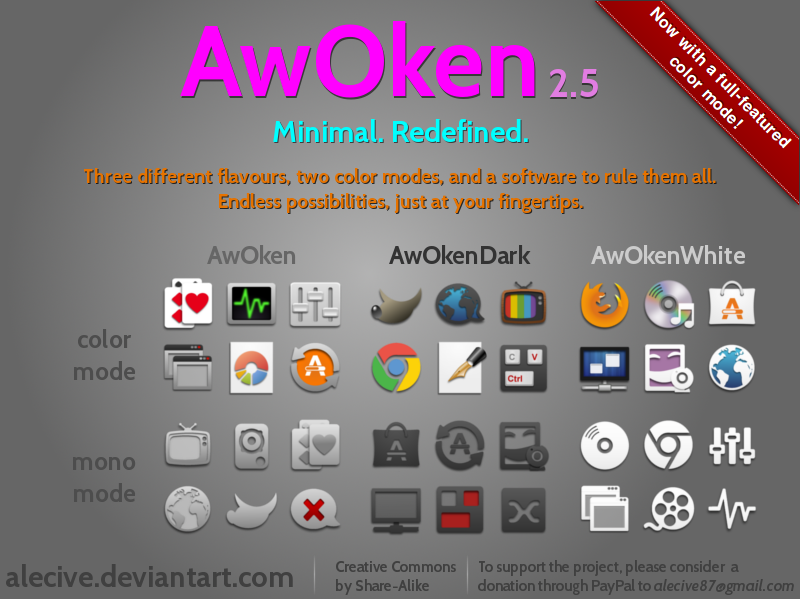
- Added a full-featured colored version! More than 500 icons were re-drawed in colored mode.
- Changed licensing: from cc-by-nc-sa to cc-by-sa! Now the iconset is completely free

- Iconset updated to Ubuntu 13.04 Raring Ringtail!
- Added ppa for Ubuntu 12.10 Quantal Quetzal and Ubuntu 13.04 Raring Ringtail
- Solved a bug in coloration script (many thanks to shadowkyogre.deviantart.com)
- Secure icons are now available in networkmanager
- New ubuntuone icons, as well as new emoticons for chat
- Added more than 50 xfce4 icons
- Added icons for gnome 3.8 applications: gnome-games, gnome-documents, gnometris, quadrapassel, gnome-boxes, gnome-disks, and more
- Added or redrawed more than 400 icons
- Added more than 200 symbolic icons
- Dropped ppa for Ubuntu 10.04 Lucid Lynx, Ubuntu 10.10 Maverick Meerkat, Ubuntu 11.04 Natty Narwhal
Complete changelog (especially for previous versions) is stored in README PDF file.
************************************************
Comments1244
Join the community to add your comment. Already a deviant? Log In


 Overall Vision
 Originality Technique Impact
While I believe that this icon set is the best there is for Linux I do believe it can be improved a bit. My main critique would be that I think the icons are a bit blurry when they are under 32px. This might be by design as it might offer better support when scaling the images, but I guess I am a little picky and prefer sharper icons. For this reason I have replaced the status icons with Faenza as they are a bit sharper and come off a bit cleaner. I would be glad to share a screen shot if requested.
Thanks